Watch your agent
speak Figma
Give your agent access to more of Figma than the official MCP.
List projects, search files, pull comments while learning about the Model Context Protocol.
Why does this matter?
Most AI tools are a black box you install and hope for the best. You're left out of the creative loop unless you want to dig through developer documentation. figmma lets you see what's happening under the covers so you can be an informed creative partner shaping the outcome with your AI tools, not just an operator.
See what's happening
Snoop on the conversation between the Figmma MCP and Figma's service.
A live view of the MCP process turns magic into mechanics.
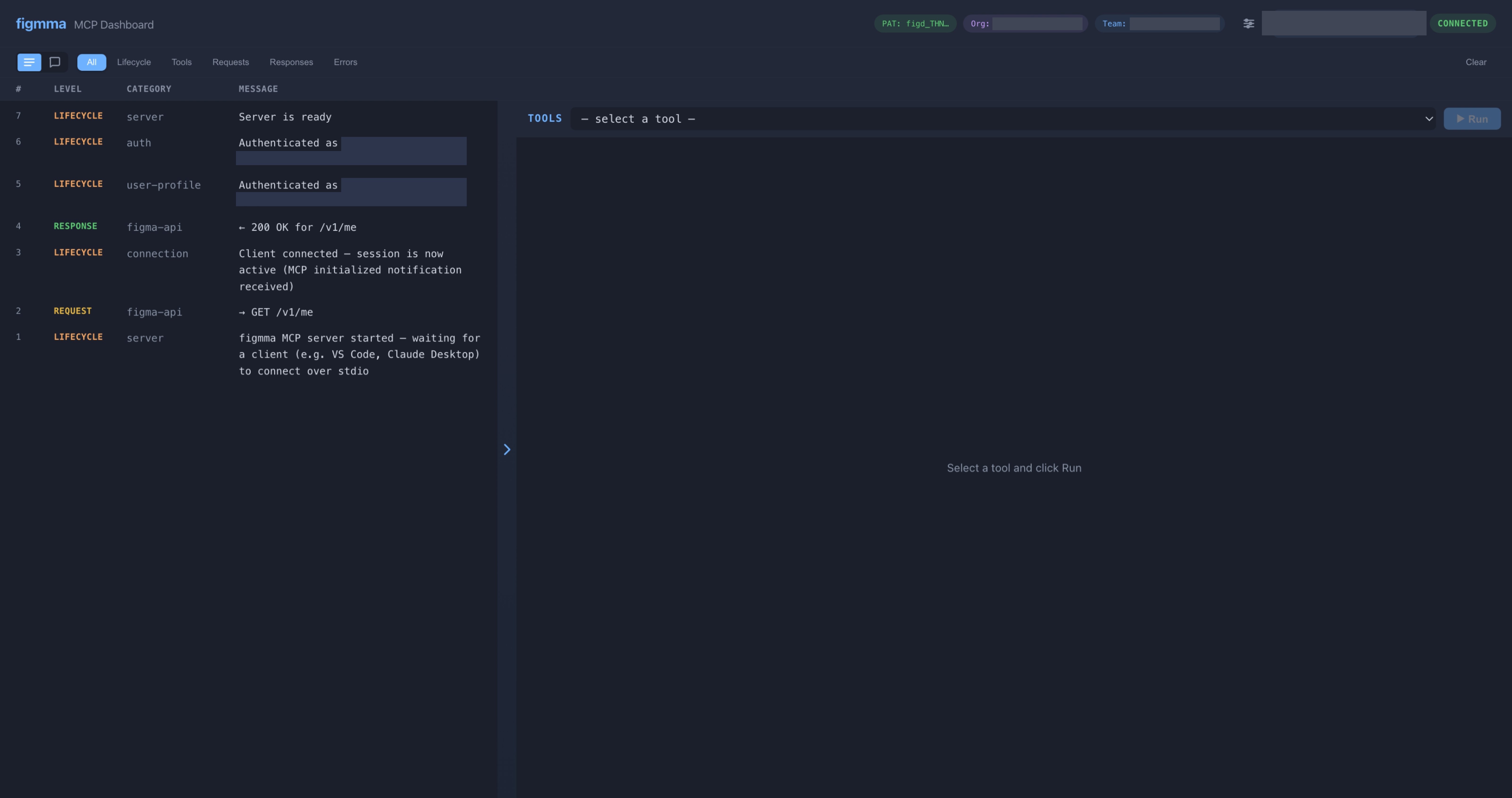
Watch every tool call in real time
Every time your agent calls a Figma tool, the dashboard logs it instantly — what tool was called, what parameters were sent, and what came back. You can see the MCP protocol in action instead of guessing what happened.
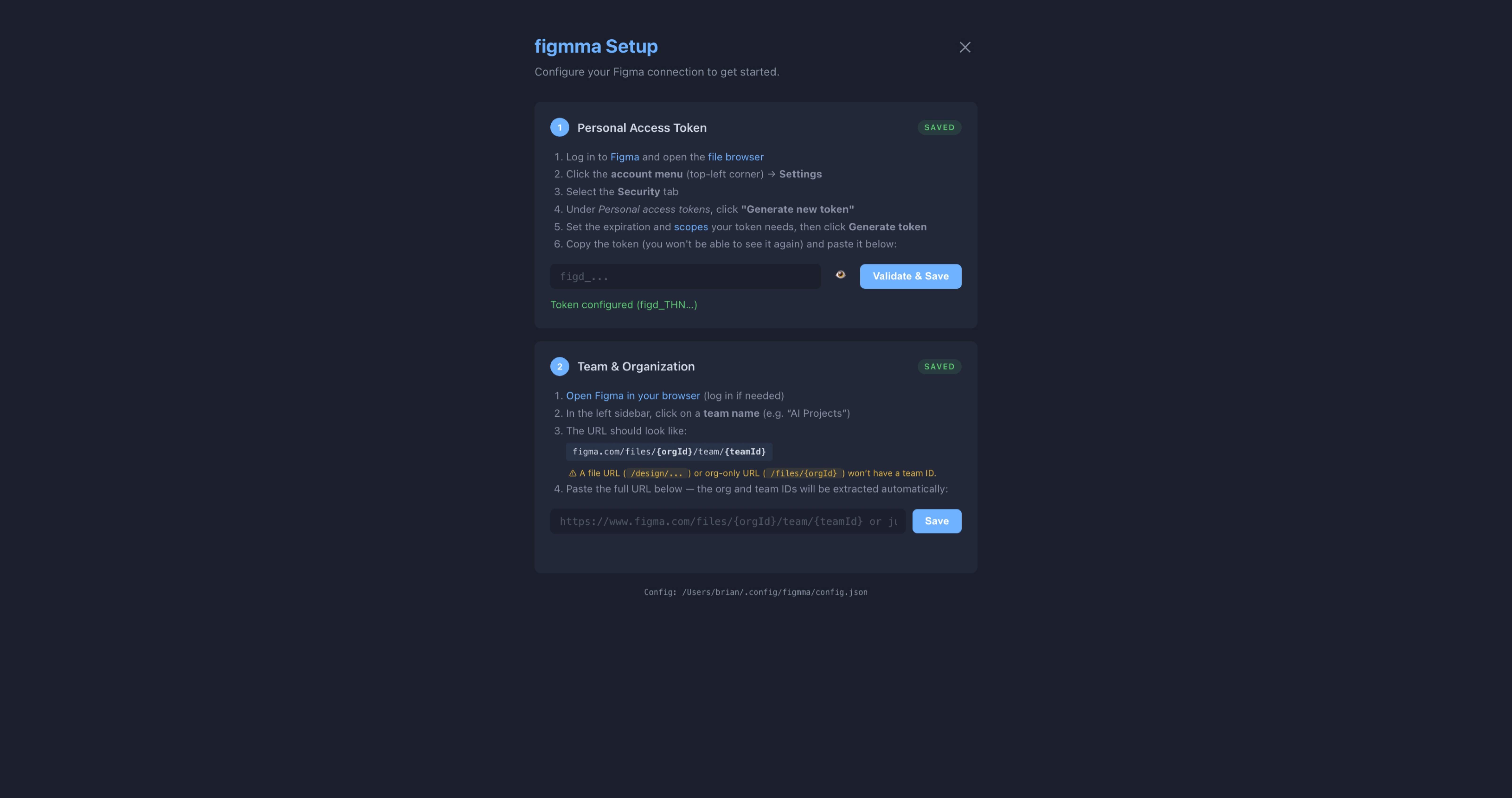
Guided setup, not a config file
Instead of hunting down JSON files and editing them by hand, figmma walks you through a browser-based setup wizard. Paste your Figma token, pick your team, and you're done.
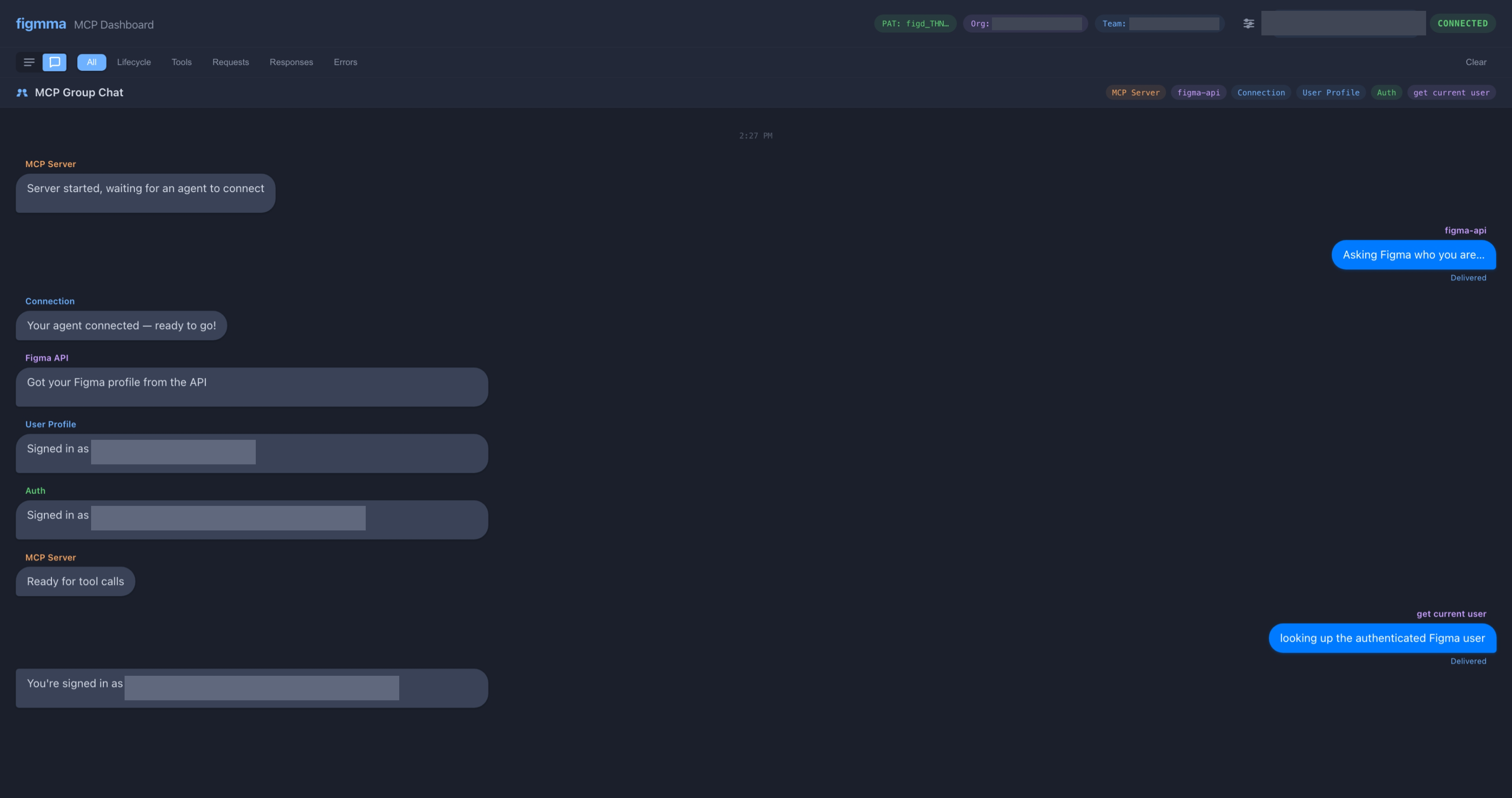
Read the agent conversation
Switch to chat view and see the back-and-forth between your agent and the MCP server as a readable conversation. Great for understanding how tool calls actually work.
7 tools for the Figma API
| Tool | Description |
|---|---|
get_current_user | Show the authenticated Figma user (cached) |
parse_figma_url | Extract file key and node ID from a Figma URL |
list_team_projects | List all projects in a team |
list_project_files | List all files in a project |
get_file_info | Get file metadata (name, version, last modified) |
search_projects | Search for files by name across all team projects |
get_file_comments | Retrieve all comments and threads on a file |
Setup in 2 minutes
Create a Personal Access Token
Open Figma → click your avatar (top-left) → Settings → Security tab → scroll to Personal access tokens → click Generate new token.
When setting scopes, select read-only for each scope figmma needs:
- File content — Read only
- File metadata — Read only
- Comments — Read only
- Team and project — Read only
Tokens expire based on the duration you choose (default: 90 days). You'll need to generate a new one when it expires. See the Figma token docs for full details.
Find your team ID
Open the Figma file browser and click on a team name in the left sidebar. The URL will look like:
figma.com/files/orgId/team/teamId/...
The team ID is the number after /team/.
You can paste the full URL into the setup wizard and it will
extract the IDs automatically.
Make sure you're on a team page — a file URL
(/design/...) won't have a team ID in it.
Install figmma
macOS / Linux:
curl -fsSL https://raw.githubusercontent.com/stuffbucket/figmma/main/install.sh | bashWindows (PowerShell):
irm https://raw.githubusercontent.com/stuffbucket/figmma/main/install.ps1 | iex
The script checks for Node.js (installs it if missing), then runs
npm install -g @stuffbucket/figmma. Postinstall
auto-registers with Claude Code, VS Code, and Codex CLI.
Enter your token and team
The first time your agent calls a Figma tool, figmma opens a
setup wizard in your browser at
localhost:5183. Paste your token and team URL there.
The wizard validates your token against the Figma API before saving.
Your token and team ID are saved locally at
~/.config/figmma/config.json — they never
leave your machine.
Done — start asking
Your agent can now list projects, search files, read metadata, and pull comments from Figma. Try asking it:
"List all the projects in my Figma team"Already know what you're doing? Here's the raw MCP config.
Claude Code .mcp.json
{
  "mcpServers": {
    "figmma": {
      "command": "npx",
      "args": [
        "-y",
        "@stuffbucket/figmma"
      ]
    }
  }
}
VS Code / Copilot .vscode/mcp.json
{
  "servers": {
    "figmma": {
      "type": "stdio",
      "command": "npx",
      "args": [
        "-y",
        "@stuffbucket/figmma"
      ]
    }
  }
}
Codex CLI .codex/mcp.json
{
  "mcpServers": {
    "figmma": {
      "command": "npx",
      "args": [
        "-y",
        "@stuffbucket/figmma"
      ]
    }
  }
}
Zero config
One curl command checks prereqs, installs Node.js if needed, and registers with Claude Code, VS Code, and Codex automatically.
Search across teams
Search for files by name across every project in your team. No more hunting through the Figma sidebar.
Comments & threads
Pull all comments from a file — threaded, with resolution status. Your agent can read design feedback directly.
URL parsing
Paste a Figma link and the agent extracts the file key, name, and node ID. No manual copying.
Live dashboard
Real-time observability UI at localhost:5183. Watch
tool calls, API traffic, and auth status as they happen.
Works everywhere
Claude Code, VS Code / GitHub Copilot, Codex CLI — one install registers with all MCP-compatible agents.
Get started in one command
curl -fsSL https://raw.githubusercontent.com/stuffbucket/figmma/main/install.sh | bashThe script handles prereqs, installs figmma, and registers it with your agent. Enter your Figma API token in the setup wizard and you're done.